
Handling Returns
Handling a return notification? Once you have received the return (and not before), process it within 7 days. On this page, you will find all information about the process.
Handling a return notification
Have you received a return notification? Legally, you must refund the customer within 14 days of the return notification, unless the customer has not yet returned the item. Since bol handles the refund on your behalf as a partner, we ask you to always process a return within 7 days. This timeframe is applied because shipping and processing a refund (by bol and the bank) takes a few days.
Processing a return notification?
Follow the step-by-step plan below to process your return notification.
Go to your return overview
You can find your return overview in your account under 'Orders' in the ' Returns' section.
Click 'Process' for the relevant return.
The blue color indicates that the return is still open and requires action from you as a partner. You can also filter by return status and check 'open returns' to view all your pending returns.
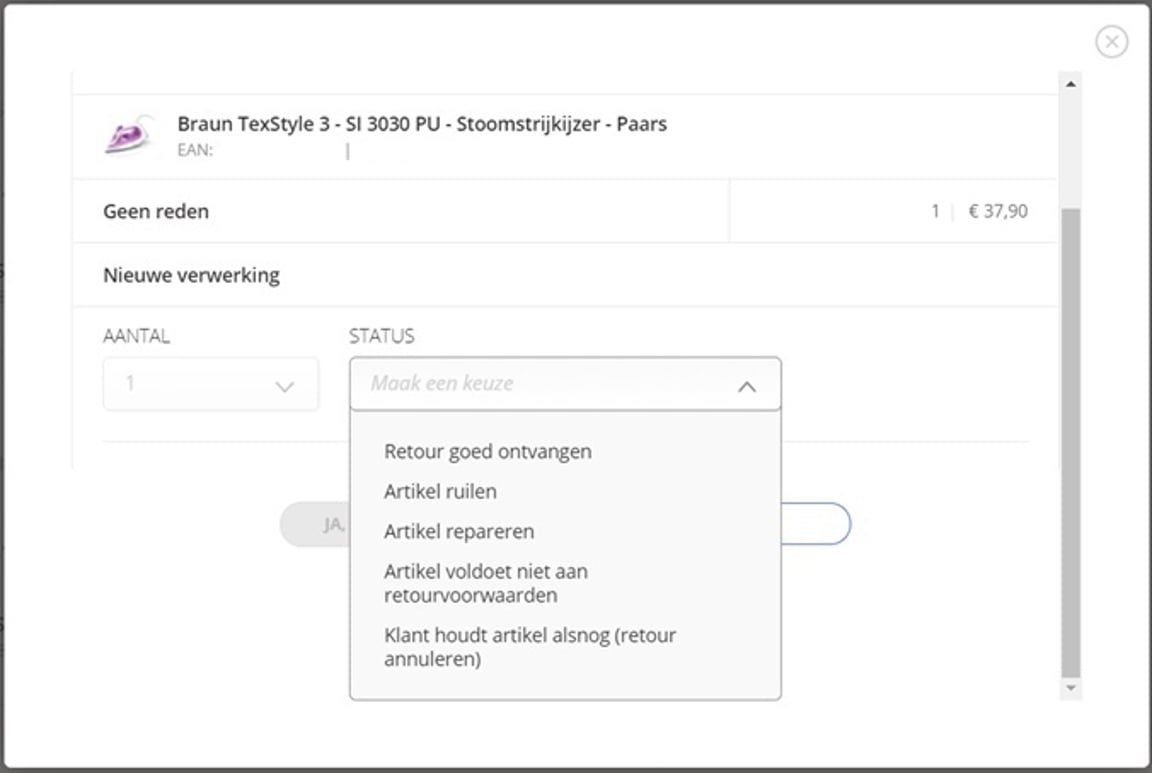
Choose a return status
Option 1: Return received in good condition
bol refunds the customer. You will not receive a payout and will not pay commission. If you have already been paid, this amount will be settled on your next invoice.
Option 2: Exchange item
First, contact the customer to determine how you will handle the return notification. With an exchange, the customer receives a new item, so the customer does not get a refund, and you will receive your payout as usual. Please note: arrange a shipping label yourself.
Option 3: Repair item
Is the item broken and can you repair it? First, contact the customer to determine how you will handle the return notification. The customer does not get a refund, and you will receive your payout as usual.
Option 4: Item does not meet return conditions
Is an item returned damaged, used, or incomplete? First, contact the customer to jointly determine how you will handle the return notification. Always consider the Distance Selling Act. If, after contact with the customer, it appears that:
- A full refund is reasonable? Then accept the return as usual. The customer gets their money back, and you will not be paid out.
- The customer still wants to keep the item? Then reject the return and send the package back to the customer at your own expense. The customer does not get a refund, and you will receive your payout as usual.
Option 5: Customer keeps the item
To verify that the customer is indeed keeping the item and that it has not been lost in the mail, it is advisable to contact the customer again. The customer does not get a refund, and you will receive your payout as usual.
Automating returns
If you want to create/handle returns in your own system and not in the seller account, you can use Automate via bol. There are various integrators that can help automate your returns, among other things. It is also possible to build and manage the integration yourself, but this requires technical knowledge. Read more about how to automate returns in the returns API .