
Finance tab and invoice specification
Read more about the finance page in your seller account and the invoice specification.
Finance tab in your seller account
At the top of the page, or tab, ‘Finance’, you'll find information about the current billing period and the interim invoice amount. This amount can change daily due to new orders, cancellations, and returns, and is updated daily. In the notification next to the interim invoice amount, you can see whether this is an amount you will receive from bol or an amount you need to pay to bol.
Below the overview, you'll find the invoices per month, where you can also immediately see if the invoice has been paid; if so, you'll see a green checkmark. Are you looking for a specific invoice? You can find it by entering the invoice or order number in the search bar.
Adjust how often you get paid
Each quarter, you can choose to have your sales paid out once or twice a month. This setting applies to the processing of all partner invoices, including sales invoices and invoices for Advertising via bol. You will always receive these separately. You set your desired payout frequency, or how often you get paid, via your seller account under the heading ‘Finance’. Under ‘payout schedule’, select how often you wish to be paid. You can always submit your change in the seller account, but it will only become active from the first day of the next quarter. It is not possible for the change to take effect sooner. You can find more about the payout model and how to set its frequency here.
Please note!
Both the invoice and payment specification are available in the seller account, on the ‘Finance’ page. Here, on the right side, you'll find both the ‘Download invoice’ and ‘Download specification’ buttons. See also the example under ‘The Finance page in your seller account’ below.
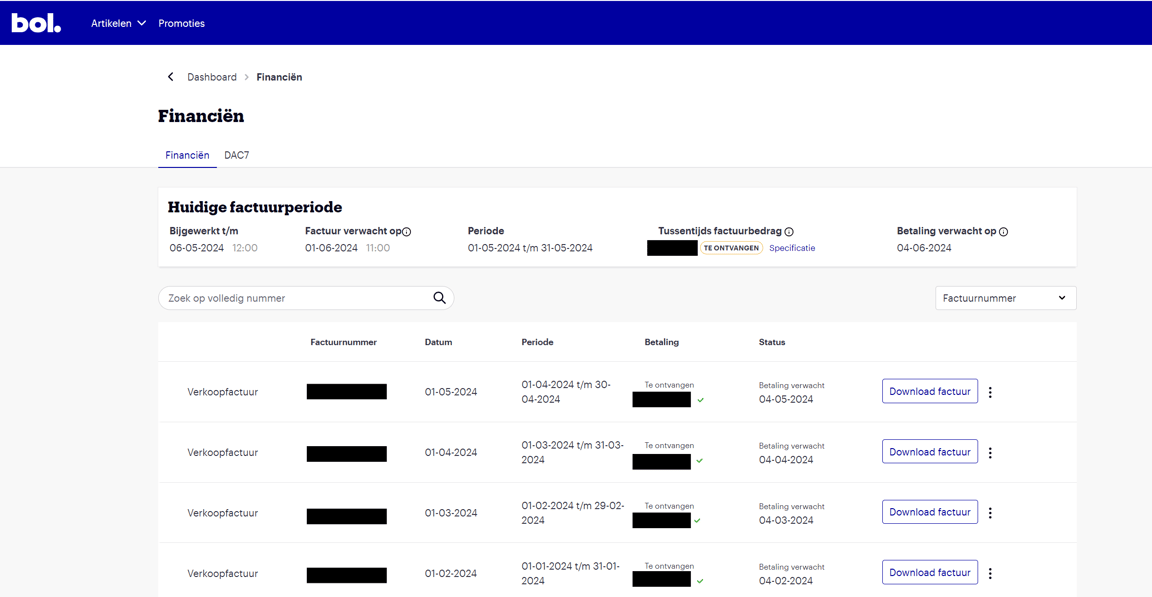
Explanation of the invoice specification
The invoice specification is a detailed overview of your Sales Invoice. Here you can find which specific items and orders are included for each part of your invoice.
Do you want to know which items have been returned? Then look at your invoice specification under the corrected sales price item(s). In the specification, you can also filter by EAN or order number, so you can see what you pay and receive per order. Additionally, in the invoice specification, you can search whether the orders are Dutch or Belgian.
The invoice specification is updated every 6 hours and is therefore always up-to-date! The amount on the interim invoice specification may therefore sometimes be lower than a few hours before. This is because write-offs and returns are processed and settled on the interim specification.