
Financial account settings
On this page, you can read more about the financial details in your seller account.
Finance
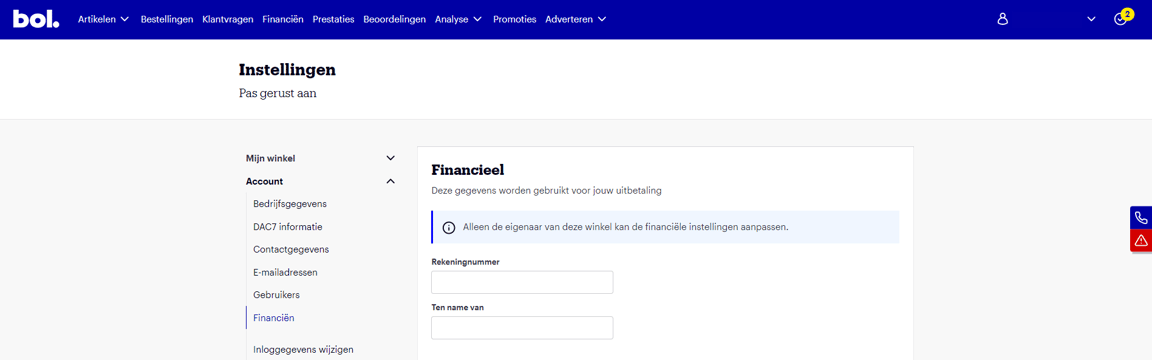
You can find your financial account settings in your seller account under 'Settings' in the 'Finance' section. Here you will find the details used for your payout.
Changing account number
You can easily change your account number yourself. To change your account number, you need two-step verification. We do this for security reasons.
Good to know:
In your seller account, you can only add Dutch and Belgian bank account numbers.
In your seller account, a Dutch account number can only be changed to another Dutch IBAN. A Belgian account number can only be converted to a Belgian account number.
The IBAN change will be active after 30 days.
Do you want to convert an account number to an account number from a SEPA country? That is also possible. Please contact Partnerservice.
Please note!
Has our Partnerservice set your account to 'Time-out' status? Then it is not possible to change your account details in your seller account. You will then receive the message 'Please contact our Partnerservice via zakelijkverkopen@bol.com to change the account number'.
Payout
Each quarter, you can choose to have your sales paid out 1 or 2 times per month. This setting applies to the processing of all partner invoices, including sales invoices and invoices for Advertising via bol. You will always receive these separately. You set your desired payout frequency, or how often you get paid out, via your seller account under the 'Finance' section. Under 'payout schedule', select how often you wish to be paid out. You can always submit your adjustment in the seller account, but it will only become active from the first day of the next quarter. It is not possible for the adjustment to take effect earlier. More about the payout model and how to set its frequency can be found here.
Frequently asked questions
about financial account settings