
Recommended items
On this page, we help partners understand what recommended items are, how they work, where to find them in the advertising environment (SDD), and how they can be directly applied to improve campaigns.

What are recommended items?
Recommended items are personal suggestions for items that are promising to add to your campaign. They are updated daily and are based on:
- Performance of items within their category
- Relevance to your product range
- Your current campaign approach
When an item performs exceptionally well and is not yet in your campaign, you will receive a recommendation. This helps you seize new opportunities without extensive analysis.
Why are these recommendations valuable?
- They show items that perform above the category average.
- Items that already perform well organically generally yield a higher ROAS.
- You can quickly improve without diving deep into data.
- You can easily discover new opportunities that fit your strategy.
With a recommendation, you can:
- Directly add the item to an existing campaign
- Replace a lower-performing item
- Improve your campaign without extra analysis
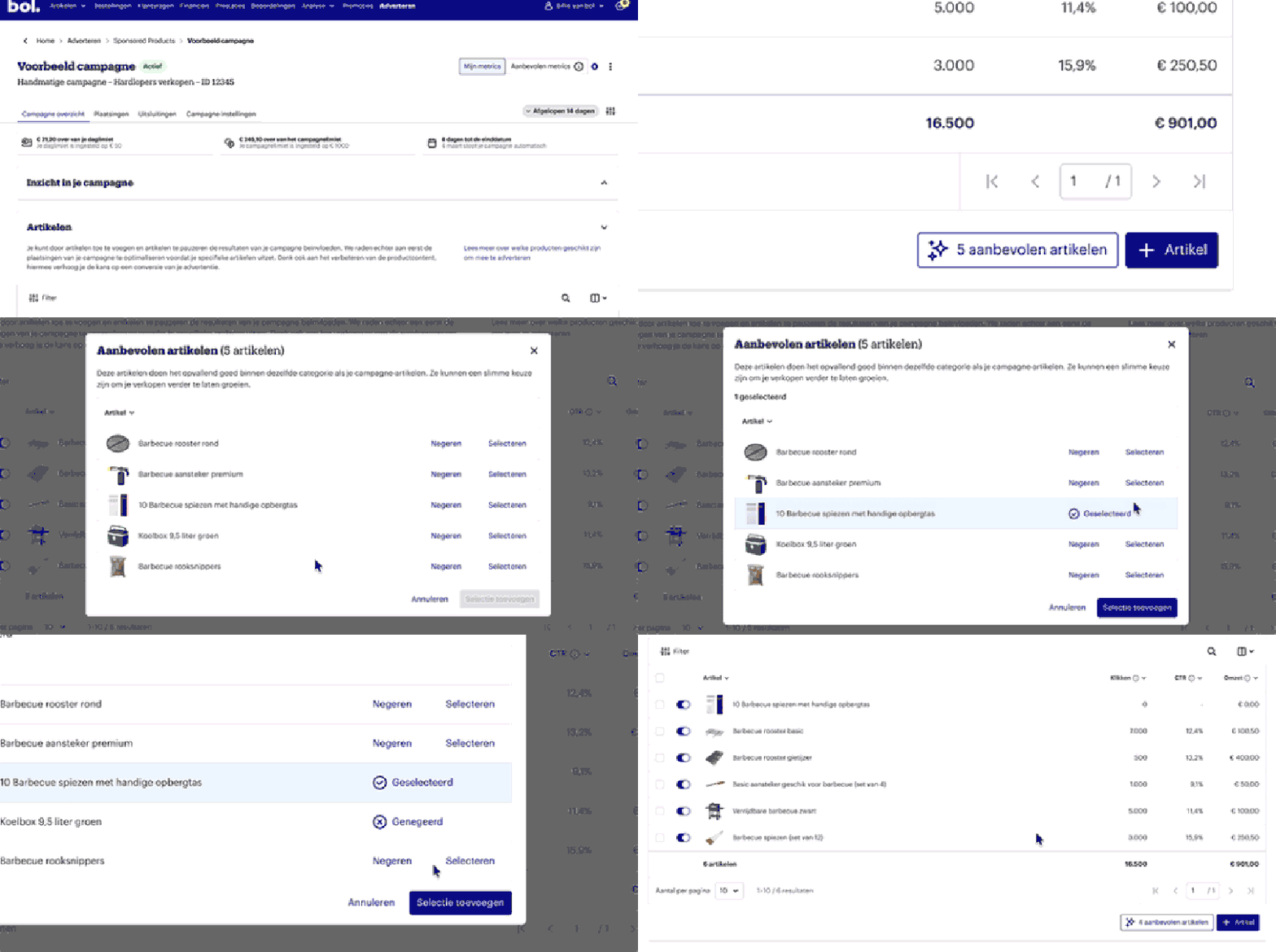
Where can you find the recommendations in the SDD?
- Go to the campaign detail page.
- Open the item table.
- If there are relevant opportunities, a recommendation button will appear next to the Add new items button.
- Click this button to view, add, or ignore the suggestions.
Tip: If you click Ignore, you make room for new opportunities that better align with your goals.
Where can you find the recommendations in the SDD?