
New: keyword advice in Sponsored Products
Good news for your manual campaigns! You now get keyword advice in Sponsored Products. You will see which search terms customers buy items on, but which you are not yet advertising on.
Customers sometimes use different words than you do. For example, you might call them 'jeans', while your customer searches for 'denim trousers'. Missing out on such a relevant keyword? You won't notice that on your own. With keyword advice, you discover which search terms customers use to find and buy items, but which you are not yet advertising on.
How does it work?
- We look at how well your items are performing in the search results of bol. Which search terms are they found, clicked, and bought on?
- You will only be advised on new keywords. Keywords you already use or have excluded are not included.
- With each keyword, you immediately see a recommended bid. This is a guideline; you still set the bid yourself.
- You decide which keywords to add. Your existing keywords will remain as they are.
Where do you find the keyword advice?
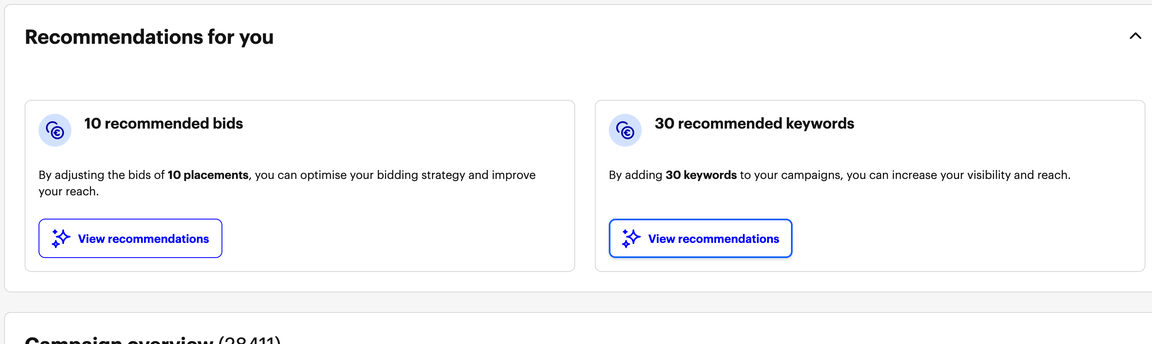
In the advice blocks on the overview of your Sponsored Products campaigns, alongside other advice. We are rolling out this advice step by step. That is why you might not see it for all your manual campaigns yet.
Good to know
- We are rolling out keyword advice step by step. Therefore, you may not see it for all your campaigns yet.
- We only provide advice if we have enough data. New items that are not yet selling in the search results will not receive advice yet.
- With a new keyword, your ad can appear when customers search for that keyword. Whether that happens depends on your bid and the competition.
- More keywords often mean more auctions. Therefore, keep a close eye on your budget and results.
Curious about what opportunities await you? Check your campaigns and discover the keyword advice.