
Contact preferences
You can specify which email addresses should receive bol (automatic) communications.
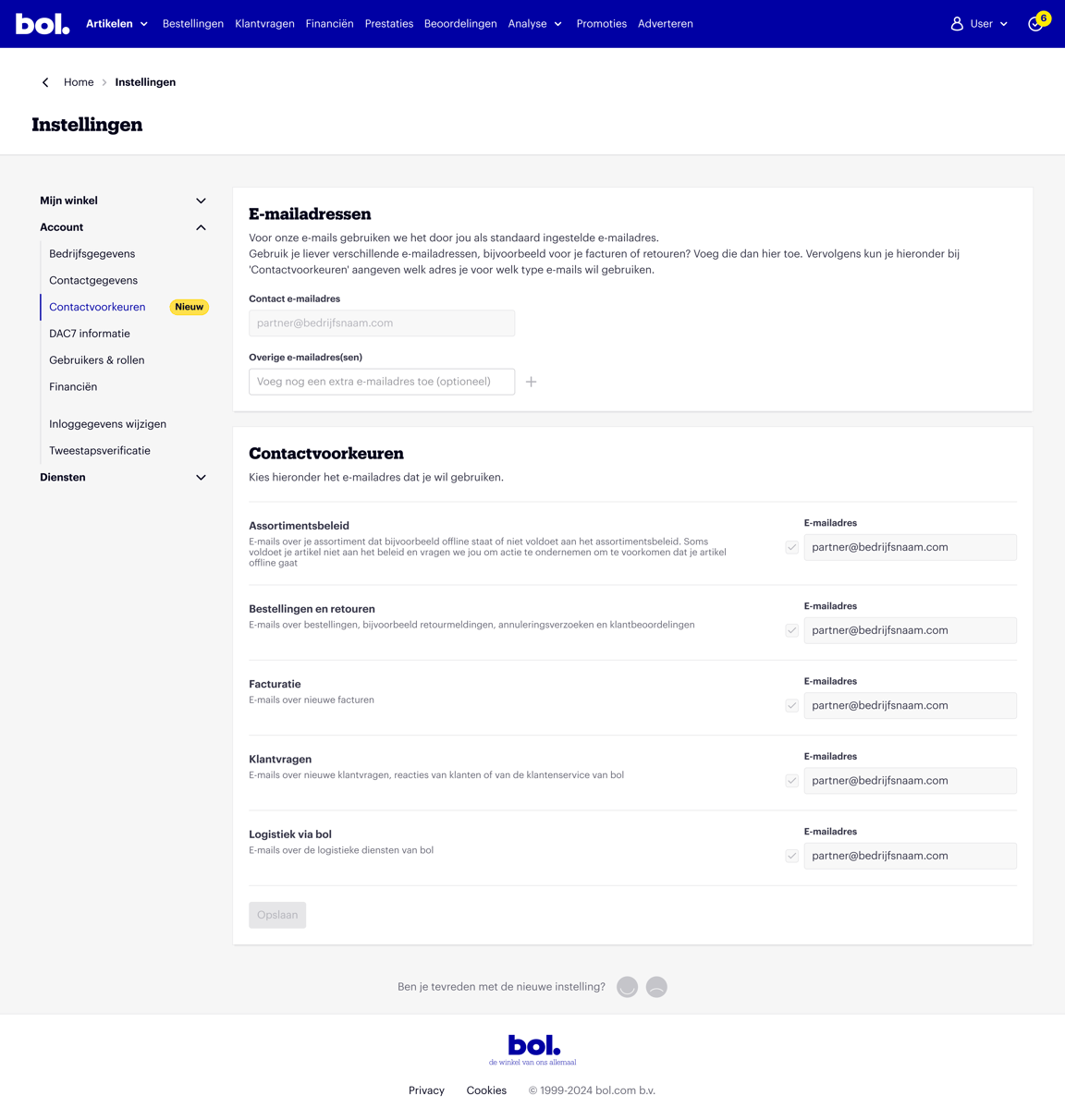
Email addresses for communication
As a partner, you receive 6 types of communication. You can enter an email address for each type of communication. You can do this in the 'Settings' section of your seller account.
The 6 communication types:
- Automatic emails: all automatically generated emails that all partners receive on various topics.
- Product range: emails about your product range that is, for example, (temporarily) offline or does not comply with the product range policy.
- Orders and returns: All (automatic) emails regarding orders such as return notifications, cancellation requests, and customer reviews.
- Invoicing: When a new invoice is ready for you, you will be informed via this email address.
- Customer questions: emails about new customer questions and customer responses.
- Shipping via bol: Do you use the 'Shipping via bol' service? For updates or information related to this service, an email will be sent to this email address.
Please note!
Have you added a new email address to contact? Then this change must still be confirmed via the verification email sent to the newly provided email address. Only then will the data be saved.
Login email address
There are several ways to adjust your login details. Read more here on how to do this.
Frequently asked questions
about email addresses