
Handle customer questions in your seller account
Read more about how to gain insights into your customer questions and how to receive them.
Customer questions overview
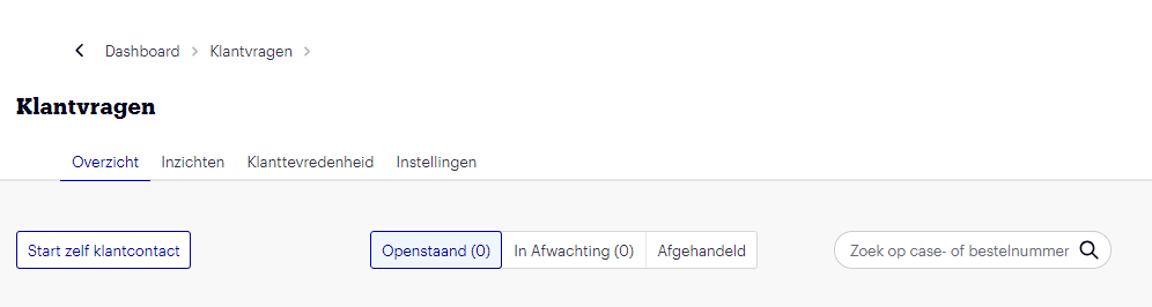
You can find your open customer questions in your seller account on your 'homepage' and in the menu under 'Customer questions'. After 18 clock hours (excluding weekend and public holiday hours), it will indicate that the question has been open for a long time. On the homepage, click 'To customer contact' or in the menu, go to 'Customer questions'. You will then see an overview of all your customer questions, and all open customer questions. The oldest customer question is at the top of your overview because it has priority. Check the customer questions that are still awaiting a response or that you wanted to follow up on later. Use the search function if you are looking for a specific customer question. Or view the list of handled customer questions. For each customer question, the order number, customer name, subject, and status are visible. Click on the customer question if you want to handle it.
When you receive a new customer question, we will send you a notification email. Click on the link in this email to go to the customer question. Is the customer question not visible? This could be because you are logged into a different seller account or because the question is being handled by our Partnerservice.
Customer question received via bol Partnerservice
bol Partnerservice can forward a customer question to you. We expect you to respond to this customer question within 24 to 48 hours. If you do not respond within this time, the customer question will automatically be forwarded back to bol Partnerservice. Once a customer question is sent back to bol Partnerservice, it will disappear from your customer questions overview. During the period that this customer question is with bol Partnerservice, the customer question will no longer be visible to you.
Need help with a customer question?
If you cannot resolve it yourself, you can send the question to our Partnerservice. More information about help with a customer question from bol Partnerservice can be found here.
Language of customer questions
All messages – whether in French, Dutch, or English – are automatically translated into your preferred language (Dutch or English) on the customer questions page of the retailer account. The original language remains visible and each message can be reverted to the original if desired. When writing an outgoing message, you can also choose whether the message should be translated into French, Dutch, or English. This keeps communication clear and efficient, without language barriers.
Start a conversation with a customer yourself
You can start a conversation with a customer about an order yourself in the seller account. You do this by clicking the 'Start customer contact yourself' button in your customer questions overview. Enter an order number, choose a subject and item, and send the customer a message. This way, you can start a conversation with the customer up to 2 years after the order. You will find the self-initiated customer contact in your customer questions overview, and any response from the customer will be added to the customer contact. We expect you to answer a customer's response within 1 working day, just like with questions the customer initiated.
Inform the customer
Does a customer want to receive a VAT invoice? You will receive a message about this in your seller account. You can upload the invoice there. So, you don't need to send the customer an email.
Do you want to contact the customer? You can do this via the encrypted email address. You will find this email address on the order page in your seller account. This address is available for 2 months after the order. Within these 2 months, you can respond to a customer question via this email address. Within these 2 months, you can initiate customer contact yourself via the encrypted email address. After these 2 months, it can only be done via a customer question.
Do you receive a customer question via the platform? You can respond to it up to 2 years after the order.
We check your email before forwarding it to the customer. This way, we ensure the customer receives a secure message. Links outside bol.com are fully written out, and formatting is usually removed.
Reopen existing customer contact
If you want to provide new information to a customer, you can search for an existing customer question in your customer questions overview in the seller account. You can search by case or order number. If the customer question is closed, you can click 'reopen' in the customer question's details. After that, you can send the customer a message.
Close a customer question as 'resolved'
Good timing when closing a customer question is important for how customers value your service. As soon as you close a customer question, we generally send an NPS form to the customer within 24 hours. More information about the NPS and how it is calculated can be found here.
When you receive a response from the customer, you might find it unnecessary to send another response, for example, if the customer also wishes you a nice day. In such cases, you can close the customer question.
Did you keep the customer question open for a while, perhaps to send new information later, but it turns out no further contact is needed? Then you can find the question and choose the 'Close as resolved' option. You can provide an explanation before closing the customer question. If the 'Close as resolved' option is not selectable, it means you have not yet had contact in this customer question. We kindly ask you to still send a message to the customer, even if you have already had contact with the customer outside of bol's systems.
Insights into your customer questions
On the 'Insights' page in your seller account, you'll find the subjects of your customer questions. You'll also see which of your sold items have received a relatively high number of customer questions. You can use these insights to adjust your processes or specific items, helping you prevent some customer questions. This, in turn, saves you time and money.
You can view all subjects of your customer questions from the past 28 days up to 6 months. You can filter by time period or by customer questions related to a specific item. The list is sorted so that the item with the most customer questions appears at the top. You can improve your product range based on your customer questions and, for example, adjust the content, delivery time, or price. Hopefully, you will then receive fewer customer questions in the future.
Customer satisfaction
On the 'Customer satisfaction' page in your seller account, you'll find your received ratings from the past 28 days. The NPS (Net Promoter Score) after customer contact is a recommendation score that indicates how satisfied customers are with the service provided in response to their customer question answered by you. When you close a customer question, the 'NPS after customer contact survey' can be sent to the customer 24 hours later. Customers answer a recommendation question, among others, by giving a score on a scale of 0 to 10. The higher this score, the more satisfied and loyal customers are. More information about the NPS and how it is calculated can be found https://partnerplatform.bol.com/en/need-help/performance/service-standards-bol-com/nps-after-customer-contact/here.
Partnerservice settings
Under 'Partnerservice settings', you can specify how and when you are reachable by phone for customers. For example, you can indicate whether you are also available for customer questions outside standard opening hours. This is often highly appreciated by customers and can have a positive effect on your customer ratings. Read more here about how to set up your Partnerservice for both the Netherlands and Belgium.