
Adjusting company details
On this page, you will find information about your company details in the account settings.
In your Seller Dashboard
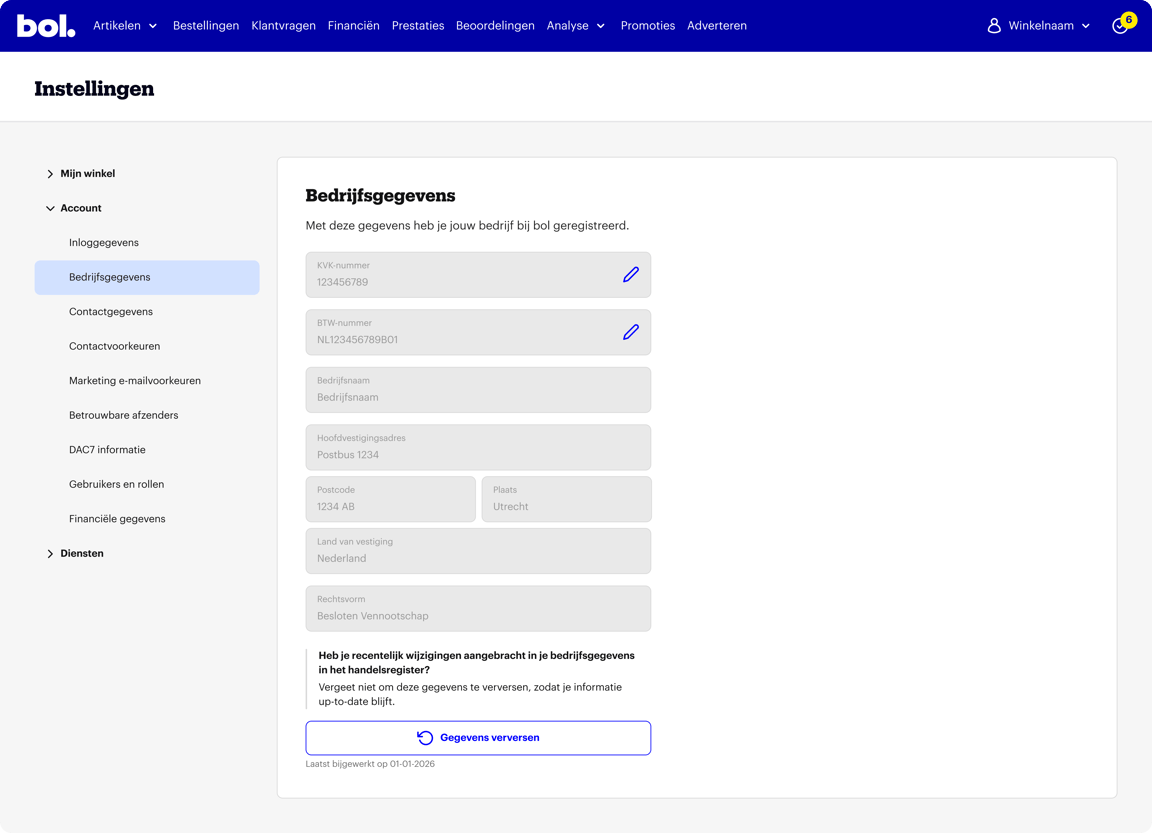
You can find your company details under: Settings > Account > Company details.
Please note
Is your company not based in the Netherlands or Belgium? Please contact Partnerservice for help with your Chamber of Commerce number or VAT number.
Adjusting your Chamber of Commerce number
In some cases, you can adjust your Chamber of Commerce number yourself. This is only possible if your company's legal form changes due to expansion, and the original owner remains involved. You can find the specific cases where this change is allowed here.
Follow the steps and confirm the change with Two-step verification. After that, we will retrieve your new details from the Chamber of Commerce. Your company name and registered address will be updated automatically.
Please note: Do you have multiple seller accounts with the same Chamber of Commerce number? We will apply this change to all of them.
Shielding your private address and refreshing data
For sole proprietorships, the company is often registered at a private address. You can provide a different address to the Chamber of Commerce. Would you like to know more about shielding your private address? You can find more information here.
Have you already shielded your private address, but it's not yet reflected? Refresh your details via your seller account. Click on 'Refresh data'. We will then automatically retrieve your latest data from the Chamber of Commerce or the Crossroads Bank for Enterprises.
Adjusting your VAT number
Dutch and Belgian partners can easily adjust their VAT number via their seller account. Confirm the change with Two-step verification. We will then check if the entered VAT number is valid.
Please note: Do you have multiple shops with the same Chamber of Commerce number or VAT number? We will apply this change to all of them.
Refreshing company details after a change
Have you adjusted your company name or registered address in the trade register? Your seller page might be outdated. Refresh your data via your seller account. Click on 'Refresh data'. You will see the new data immediately. You will also see when your data was last updated.
Changing company details from another country
It is not possible to change your company details to details from another country. This includes your company number or VAT number.
Has your company moved to another country? Then apply for a new seller account via 'selling via bol as an EU partner'.
Please note: additional conditions apply to EU partners. Therefore, we cannot guarantee that you will receive a new seller account.