
Stock analysis
The stock analysis is a dashboard that can be found in your seller account. Here you can see how healthy your stock for Logistics via bol is.
What sells well? And which items are barely or not rotating? You can find the stock analysis dashboard in your seller account under Items. It gives you more insight and control over the health of your stock.
Stock health: Your stock health is determined based on the expected speed (number of weeks) at which items are sold. This sales forecast is based on your sales history from the past 12 weeks.
The main benefits:
- A complete overview of your product range and what sells well or less well.
- Advice on reducing stock of items, so you can make better use of your storage capacity (stock ceiling).
- Insight into stagnant product range and its costs, such as stock costs.
Your dashboard
In your dashboard, you'll find different tabs, from 'Overview and action' to 'Export Excel'. Below, we explain what information you can get from each tab.
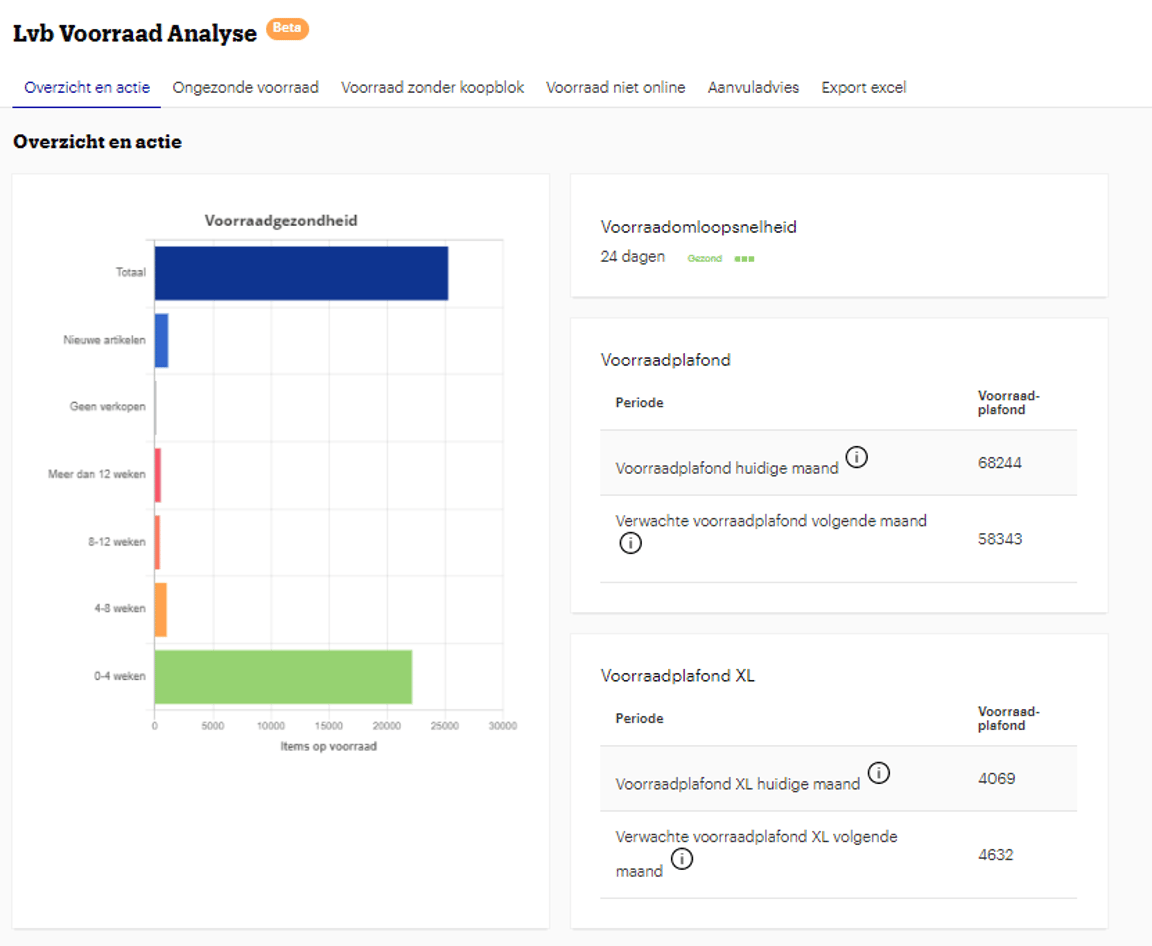
Overview and action
Stock health has 6 categories:
0 to 4 weeks: You have healthy stock. These items are expected to sell within 4 weeks. For this product range, you should replenish your stock in time.
4 to 8 weeks: Your stock health is sufficient. Although you are above the ideal stock level, the items are rotating. These items are expected to sell within 4 to 8 weeks.
8 to 12 weeks: Your stock health is insufficient. This means you have too much stock of this product range. To improve the rotation of these items, you can take action. For example, improve the content of your items or adjust the selling price.
12+ weeks: Your stock health is poor. This means you have too much stock of this product range. It may be wise to recall items (consider the costs of items that don't rotate). You can also take action to stimulate sales of these items.
No sales expected: No sales are expected for this part of your stock. This could be because you are not in the buy box, the items are not online, or customers do not find the product range relevant. Take action to improve sales of the items or return the stock.
New items: You offered this part of your stock online for the first time less than 6 weeks ago. There is insufficient sales history available to provide a reliable sales forecast, and therefore it is not included in the calculation of your stock health. Note: these items do count towards your stock ceiling.
Unhealthy stock
Here you see an overview of all items for which it is advised to reduce stock. Insights are shown to help you take the right actions. You will see your sales forecast for the next 28 days, your sales over the past period, and how many customers find your item.
Long-standing stock
Long-standing stock refers to items that have been unused in stock for a period longer than 180 days, without being sold. This may indicate that you have too much stock or that it is not rotating well, leading to unnecessary costs.
In your seller account, you can see which items have been in our fulfilment centers for longer than 180 days. Check the Lvb Stock Analysis dashboard, under the "Unhealthy Stock" tab. In the column "Stock >180d", you will get an overview of the number of items per EAN that have been in stock for more than 180 days.
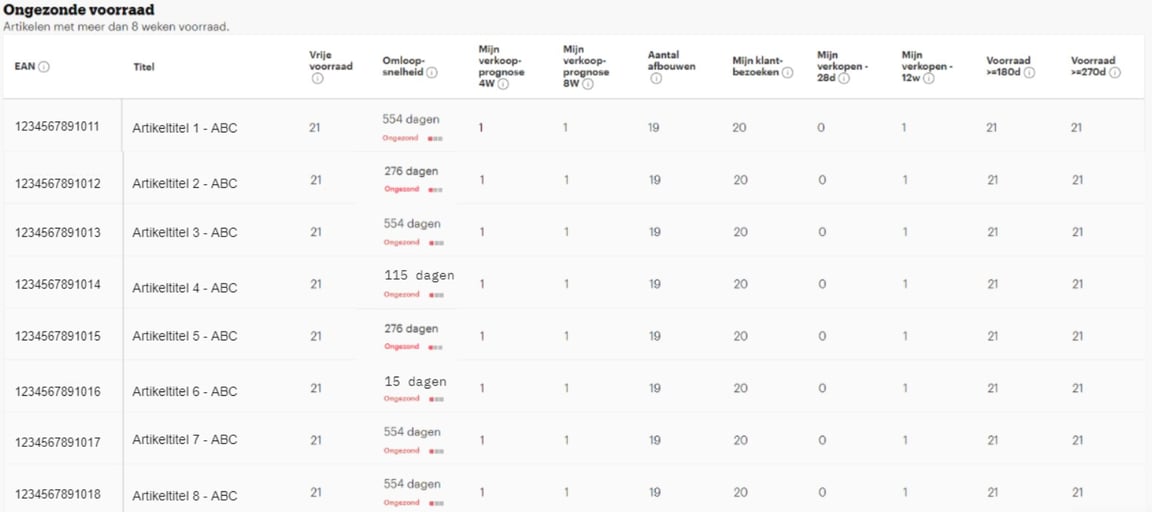
On this page, you will find valuable tips to get more control over your long-standing Lvb stock.
Stock without buy box
Here you see an overview of all items where another provider is in the buy box. This means that most sales of this item will go to that provider. This has a negative impact on your stock health. You can take action by lowering the selling price to get into the buy box. If not, consider recalling stock.
Stock not online
It can happen that items are in stock but not available for sale online. In this tab, you will see the items whose stock is not online. This can have several reasons. Check your seller account to see what you can do to get your items back online as quickly as possible.
Note: items that are not available for sale online have a negative impact on your stock health and count towards your stock ceiling.
Replenishment advice
In this tab, you will find items for which there is insufficient stock to meet expected sales for the next 4 weeks. We therefore advise you to replenish your stock.
Note: replenishing stock is only possible if you remain within your stock ceiling. If that's not possible? Then make space by reducing slow-selling product range.
*The advice in the Stock Analysis dashboard is non-binding. No rights can be derived from it.