
Bids & budgets
Branded Shelves operates on a CPC (Cost per Click) model. This means you only pay for your ad if a customer actually clicks on it. Additionally, it works via a 2nd price auction model. This considers not only your bid but also the relevance of your campaign and that of your competitors.
Floor price and maximum bid limit
The floor price (or minimum bid) is the minimum amount you must bid based on your campaign targeting. The starting price for all inventory is the same. Branded Shelves also sets maximum bid prices in campaigns to ensure fair competition and a good advertiser experience.
Why?
- Prevents overly aggressive bidding, which can lead to higher costs per click
- Helps you avoid unintentional overspending that can quickly deplete your budget
A maximum bid limit ensures that all advertisers – big and small – can compete fairly.
How to set a bid?
When setting up your campaign, you first decide which keywords or placements you want to be visible on. Then, you can set a bid for each keyword or placement and manually improve it during the campaign. This way, you can improve and guide your campaign using different bidding strategies.
Click prices
The cost per click is influenced by factors such as:
- Competition for the keyword or within the category
- Your set bid and your competitors' bids
- The relevance of your campaign
How do I determine the right bid?
As mentioned earlier, bids are an important part of the algorithm. If your bids are not competitive enough, you won't win the auction.
To determine the right bid, it's important to define your strategy and desired ACoS.
For example
If your goal is to increase your brand's visibility and you want to reach a wider audience, it might be smart to increase your bids for these specific campaigns and targeting.
Tip!
Make sure you
monitor your campaign
and adjust bids if
necessary.
Budgets
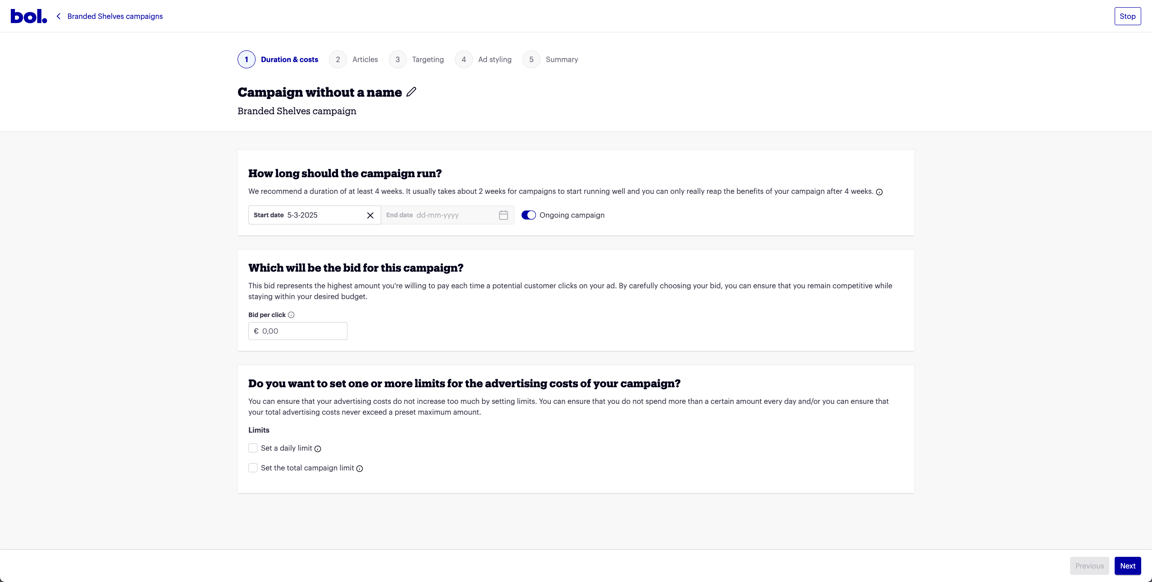
If you want to ensure that your advertising costs don't exceed what you've planned, you can set a budget. The budget indicates how much money you want to spend to achieve your campaign goals, and you set it at the campaign level.
- Campaign budget – Determines how much is spent per individual campaign.
- Account budget – Sets a maximum amount for all Branded Shelves campaigns combined.
Setting a campaign budget
- By setting a daily limit, you ensure that your campaign doesn't spend more than the set amount on a daily basis.
- With a total campaign limit, you can ensure that your campaign doesn't spend more than the set amount within the specified timeline.
Tip!
Make sure you
monitor your campaign's
pace and your
budget's reach.
Setting an account budget
Want to keep control of your total advertising budget for Branded Shelves? Then set an account budget. If this budget runs out, all your Branded Shelves campaigns will automatically stop running.
How it works
Setting an account budget for Branded Shelves works the same as for Sponsored Products. When creating your budget, simply choose 'Branded Shelves' as the ad type.
Good to know
- Do you already have an account budget for Sponsored Products? Then you need to set a separate budget for Branded Shelves. The budgets are not automatically combined.
- Don't you use an account budget for Sponsored Products? Then setting a budget for Branded Shelves is optional.