
Bidding & budgets
Discover more about the different bidding strategies for sponsored products and find the perfect strategy for your campaign. You will also find information here about click prices and setting up budgets.
Bidding strategies
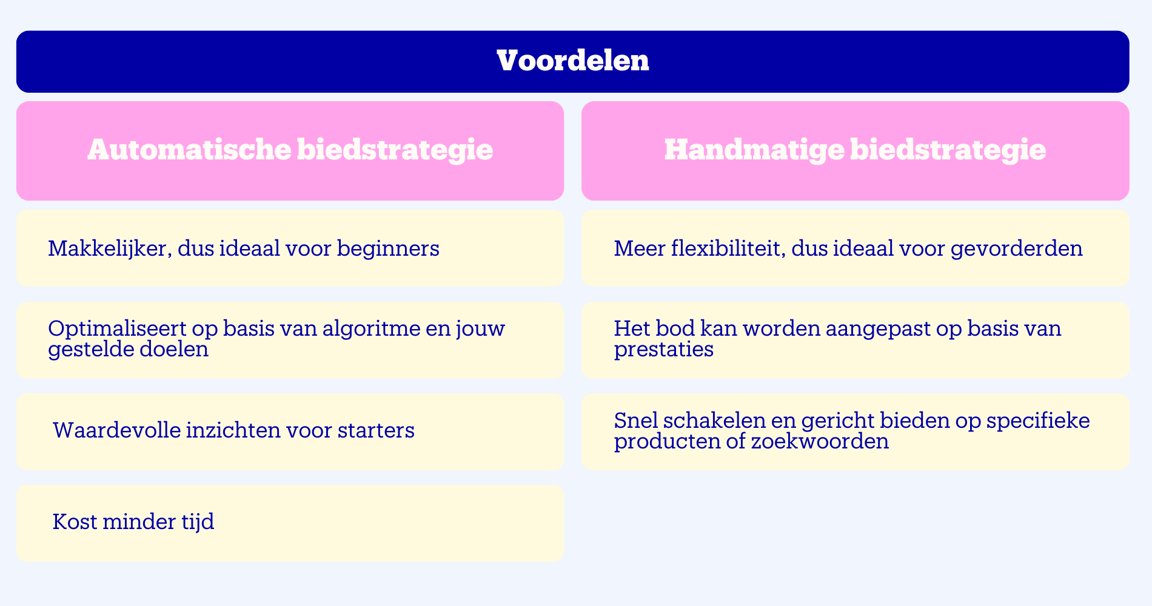
With sponsored products, there are 2 different bidding strategies: automatic and manual. Running an automatic campaign? Then an automatic bidding strategy belongs to it. Ideal if you are just starting out with advertising. A manual campaign requires a manual bidding strategy. You then decide yourself how high your bid is per keyword.
Tip from our expert
Always start with an automatic bidding strategy. This gives you a lot of insights that you can subsequently use in a manual bidding strategy.
Click prices
With sponsored products, you pay per click and only when visitors actually click on your item. The cost per click is influenced by, among other things:
- the competition on the keyword
- your set bid
- the item price
- the delivery time
Budgets

This video cannot be played. To watch YouTube videos, you need to provide your consent for the use of your click and search behavior for personalized ads outside bol.
With sponsored products, you only pay when a visitor actually clicks on the item from your campaign. Displaying your ads is therefore completely free. When setting up a campaign, you specify the maximum amount you want to spend and the maximum you want to pay per click from a potential buyer. This keeps you in full control. You can choose:
- A daily budget
With every click, the value of that click is deducted from your remaining daily budget. As soon as your daily budget is reached, no more ads will be shown for the rest of that day. We recommend starting with a daily budget of 15 euros and monitoring the results closely during the first few days.
Please note!
A drawback of a daily budget is that when the budget runs out, your campaign is automatically paused. This can be a missed opportunity, as 40% of purchases take place after 17:00. So make sure you have a budget that is large enough to stay visible all day long.
Available soon!
Currently, we use a fixed daily budget for advertising. This means that as an advertiser, you are no longer visible in the evening on busy days once the budget runs out. On quiet days, budget remains unused. To prevent this, we will soon offer the option of an average daily budget calculated across a full calendar month. This allows us to respond better to shifts in demand, helping campaigns achieve better results.
- A campaign budget
The maximum amount you want to spend on your campaign. Useful for situations where you have a fixed budget, such as a product launch or promotional campaign. By setting a limit, you know the maximum costs in advance. Once the budget limit is reached, the campaign pauses automatically. It might take a little time to get going again after reactivation because the algorithm needs to find the best combination again.
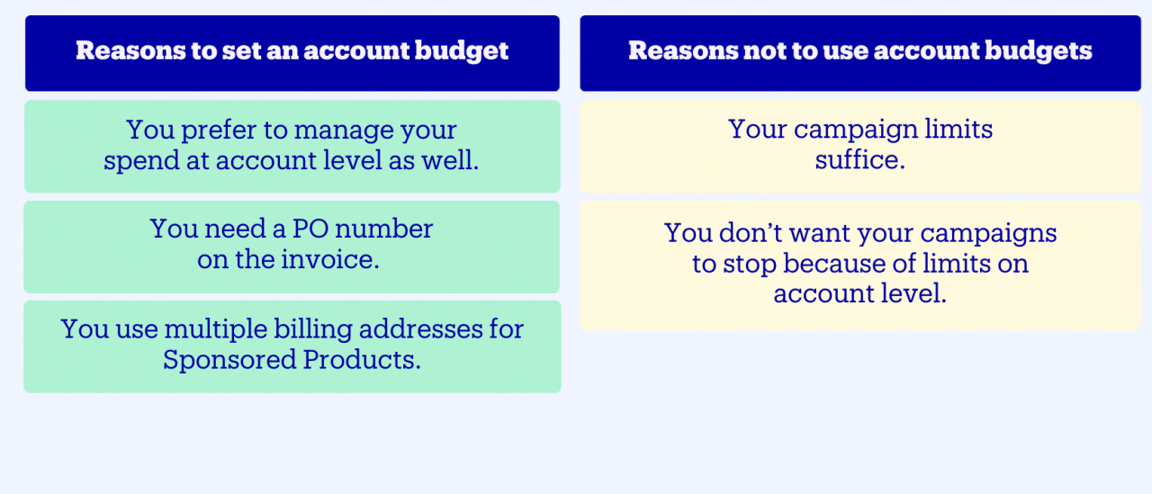
- An account budget
Useful if you do not want to spend more than a specific amount over a certain period. This gives you more options to manage your budget at the account level. Keep in mind that your campaigns will go offline once the amount or end date is reached.
Multiple account budgets for different periods
You can set up multiple account budgets at the same time for different consecutive periods. However, only 1 budget is used at a time. How do we determine which budget that is?
- We check which budgets are currently valid.
- Have you set an end date? Then we select the budget that expires first.
- If the end dates are the same, the budget created first is used.
As soon as the account budget runs out or the end date is reached, no more ads will be shown and all campaigns will be turned off.
How to set up an account budget

This video cannot be played. To watch YouTube videos, you need to provide your consent for the use of your click and search behavior for personalized ads outside bol.
How to set up an account budget
Go to the 'Budget' page
Turn on the option 'Set account budget'
Describe your budget and enter the desired amount
Determine the start date and optional end date
Save the budget
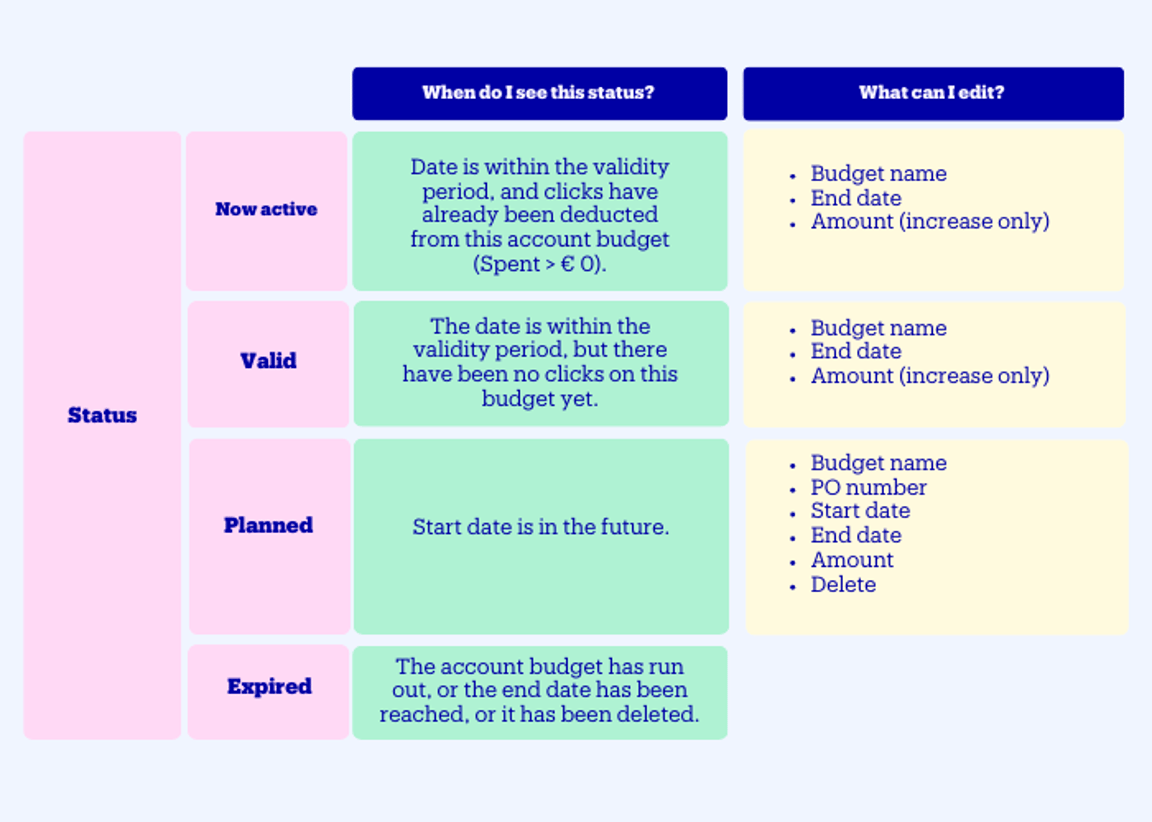
Account budget status
What do the different statuses of your account budget mean? And what can you adjust per account budget status? We're happy to explain.
Multiple account budgets
You can set up multiple account budgets at the same time, for example for different periods. However, only 1 budget is used at a time. How do we determine which budget that is?
- We check which budgets are currently valid
- Have you set an end date? Then we select the budget that expires first
- If we cannot take a click from the largest budget with the earliest end date, the budget that was created first will be used
As soon as the account budget runs out or the end date is reached, no more ads will be shown and all campaigns will be turned off. You can also disable an account budget at any time.
Ran through your budget again?
Do you notice that your budget often (nearly) runs out? Then increase your budget. This keeps your campaigns running smoothly and ensures you stay continuously visible to customers. Especially in the beginning, it can take some searching to find out which budget works best.
- Portfolio budgets: multiple budgets side by side
With Portfolio budgets, you can create multiple separate budgets within a single bol account. Instead of funding all campaigns from one general account budget, you divide your budget across specific portfolios (for example per brand, business unit, or department) with separate PO numbers aligned with your internal invoicing and purchasing rules. You link the campaigns belonging to each portfolio budget to that specific budget. As soon as the portfolio budget runs out or expires, the associated campaigns stop (unless they are linked to another valid budget).
Portfolio budgets are completely optional and available if you already use account budgets. If you only use campaign budgets or the regular account budget and this currently works well for your organisation, we recommend continuing to advertise that way.
Useful to know: you can link campaigns to multiple portfolio budgets for a seamless transition, for example from your current to your next quarterly budget.
Are your campaigns continuing, but are your PO numbers changing (for example for the new quarter)? Create a new budget and copy the linked campaigns from an existing budget.
Enable Portfolio budgets
This video cannot be played. To watch YouTube videos, you need to provide your consent for the use of your click and search behavior for personalized ads outside bol.
Linking a new campaign
This video cannot be played. To watch YouTube videos, you need to provide your consent for the use of your click and search behavior for personalized ads outside bol.
Link campaign to multiple budgets
This video cannot be played. To watch YouTube videos, you need to provide your consent for the use of your click and search behavior for personalized ads outside bol.