
Create shipment for items with multiple EANs
For some items, such as an identical beauty item with different language versions, multiple EAN (European Article Number) codes may exist. For correct processing in the Fulfilment center, it is essential that you pre-notify and supply the correct EAN: the EAN that is physically on the item.
Step-by-step plan for a shipment that deviates from the EAN
Follow the step-by-step plan below to create a shipment with one or more items that may differ from the EAN in your current offer.
Check the EAN
Before you start: check if the EAN on your item is already known in your seller account
- Check your seller account to see if the EAN physically on the item has also been added to your seller account under “My items”. If you search for the EAN and the item appears, proceed to step 2.
- If the item does not appear when you search for the EAN in ‘My Items’? Then you may need to add this EAN. Go to ‘Add item individually’ and enter the EAN here.
- If it appears that you can still add the item? Then create a new item and link it to the EAN that was already in your offer. Follow the step-by-step plan for this: ‘Add new item’
- Please note: shipments with unknown EANs cannot be processed correctly. This increases the chance of errors in the Fulfilment center
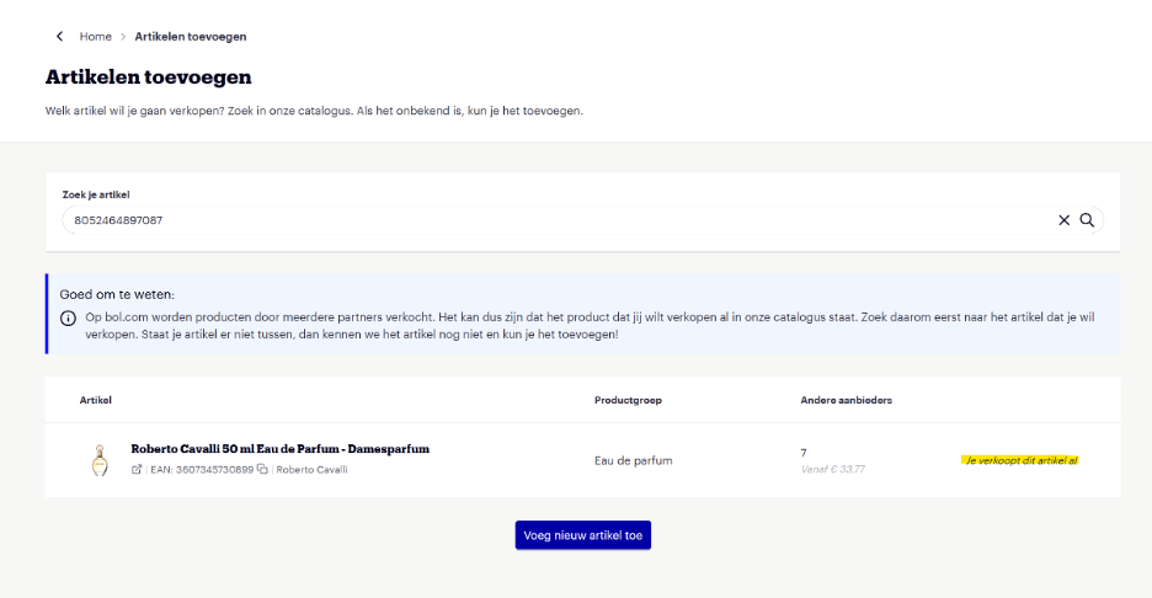
If it appears that you are already selling the item, as shown in the example below? Then you have a different EAN in your product range that is already linked to this EAN. Then proceed to step 2.
Create shipment
- Log in to your seller account.
- Navigate to ‘Items’ in the menu.
- Click on ‘Create new LvB shipment’ to create a new shipment.
Select the correct items
- Indicate which items you want to send and in what quantities.
- Optionally use the ‘Add bulk items’ button if you want to add multiple items at once.
- EANs that are physically on the item and linked to an item in your offer can also be found and selected via the search bar.
- Ensure that the quantity you enter exactly matches the quantity you are sending.
- You can include multiple items with different EANs in one shipment, as long as they are all known to bol and linked to the EAN you have in your offer.
- Important: only select the EANs that are actually on the physical item. This prevents errors in the processing.
Finally: avoid processing errors
An accurate pre-notification is crucial for smooth processing at the bol Fulfilment center. Incorrectly supplied EANs lead to incorrect processing, delays, or returns. Therefore, always check that the correct EAN (as on the physical item) is selected during pre-notification.