
Bids & budgets
Discover more about the different bidding strategies for sponsored products and find the perfect strategy for your campaign. You will also find information here about click prices and setting budgets.
Bidding strategies
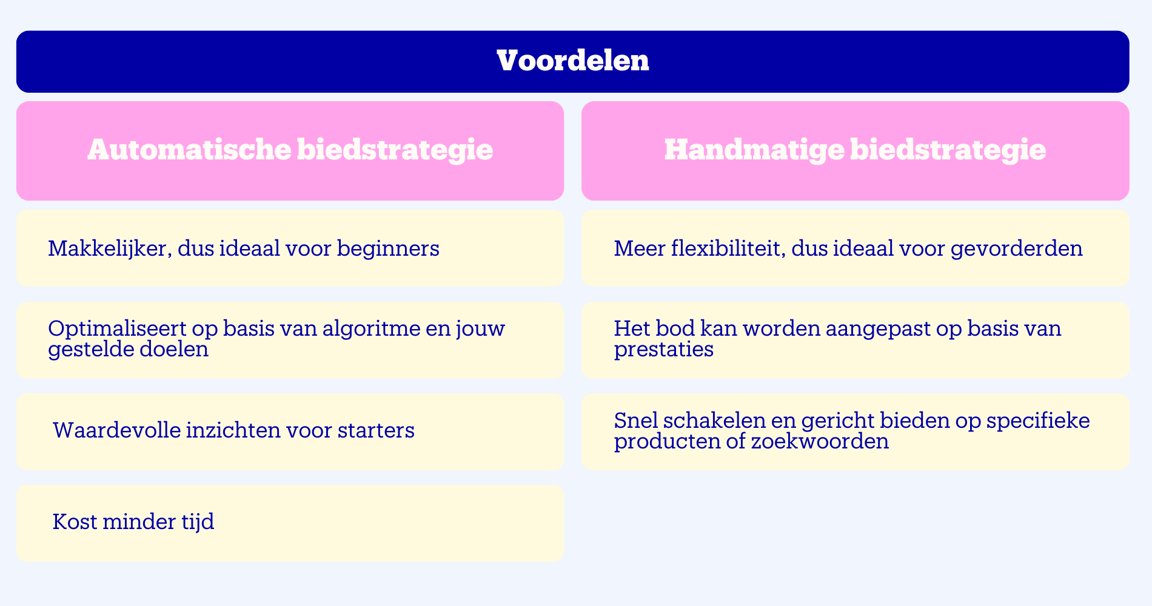
For sponsored products, there are 2 different bidding strategies: automatic and manual. Do you have an automatic campaign running? Then an automatic bidding strategy is appropriate. This is ideal if you are just starting to advertise. A manual campaign requires a manual bidding strategy. You then decide how high your bid is per keyword.
Tip from our expert
Always start with an automatic bidding strategy. This provides you with many insights that you can then use for a manual bidding strategy.
Click prices
For sponsored products, you pay per click and only when visitors actually click on your item. The cost per click is influenced by:
- the competition for the keyword
- your set bid
- the item price
- the delivery time
Budgets

For sponsored products, you only pay if a visitor actually clicks on the item from your campaign. So, only displaying your ads is free. When you set up a campaign, you specify how much you want to spend at most, and how much you want to pay at most per click from a potential customer. This way, you are in control. You can choose from:
- A daily budget
With each click, the value of that click is deducted from your remaining daily budget. Once your daily budget is reached, no more ads will be displayed for the rest of that day. We recommend starting with a daily budget of 15 euros and closely monitoring the results in the first few days.
Please note!
A disadvantage of a daily budget is that when the budget is used up, your campaign is automatically paused. This can be a missed opportunity, as 40% of purchases occur after 5:00 PM. So, ensure you have a budget that is ample enough to remain visible throughout the day.
Coming soon!
Currently, we use a fixed daily budget for advertising. This means that as an advertiser, you are no longer visible in the evening on busy days if the budget is used up. On quiet days, budget is left over. To prevent this, we will soon offer the option of an average daily budget over a full calendar month. This way, we can better respond to changes in demand, leading to better campaign results.
- A campaign budget
The maximum amount you want to spend on your campaign. Useful for situations where you have a fixed budget, such as for a item launch or promotional activity. By setting a limit, you know the maximum costs in advance. If the budget limit is reached, the campaign automatically pauses. It may take some time for it to get going again after reactivation because the algorithm needs to find the best combination again.
- An account budget
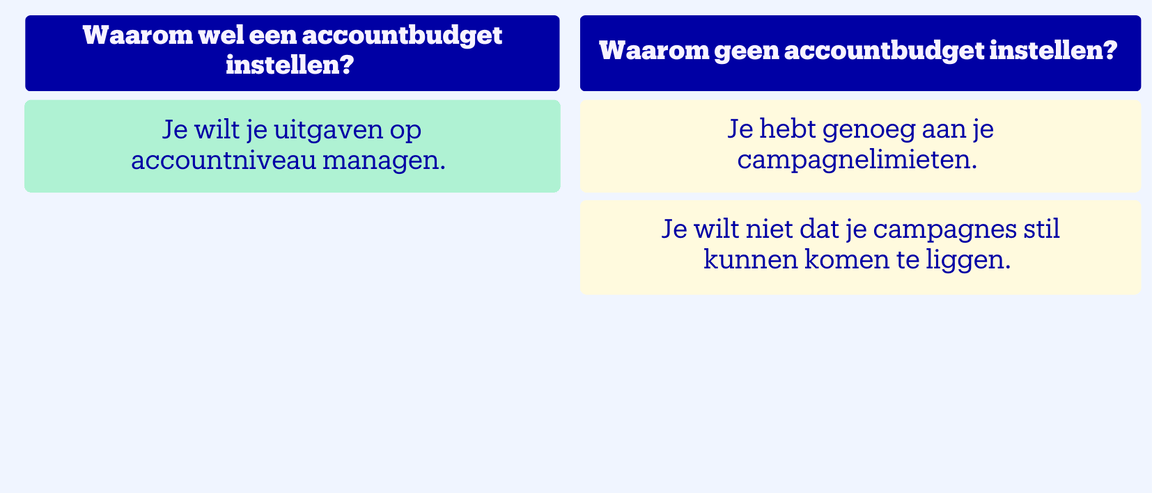
Useful if you do not want to spend more than a specific amount during a certain period. This gives you more options to manage your budget at the account level. Be aware that your campaigns will go offline if the amount or the end date is reached.
How to set up an account budget

How to set up an account budget
Go to the 'Budget' page
Turn on the 'Set account budget' option
Describe your budget and enter the desired amount
Determine the start and any end date
Save the budget
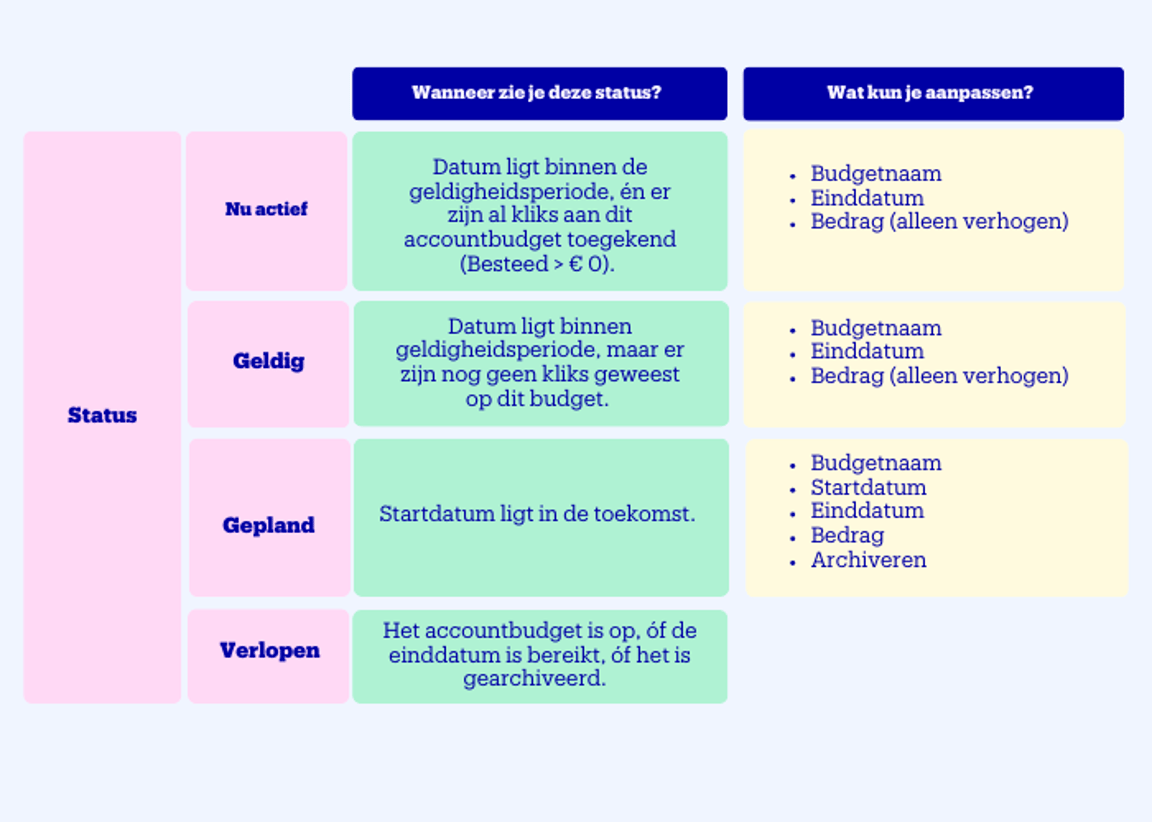
Account budget status
What do the different statuses of your account budget mean? And what can you adjust per status of your account budget? We are happy to explain.
Multiple account budgets
You can set up multiple account budgets simultaneously, for example, for different periods. However, only 1 budget is used at a time. How do we determine which budget that is?
- We check which budgets are valid at that moment
- Have you set an end date? Then we select the budget that expires first
- If we cannot deduct a click from the largest budget with the next end date, the budget that was created first will be used
Once the account budget is used up or the end date is reached, no more ads will be displayed, and all campaigns will be turned off. You can also always disable an account budget.
Already out of budget?
Do you notice that your budget is often (almost) running out? Then increase your budget. This way, your campaigns will continue to run, and you will remain continuously visible to customers. Especially in the beginning, it can be a bit of a search to find out which budget works best.