
Add French content
Here's how to provide high-quality translations for the content yourself.
French content
We understand that language can be a barrier when growing in French-speaking Belgium. That's why we ensure that items eligible for selling via bol in French-speaking Belgium are automatically translated from Dutch to French. For now, this also applies to new product ranges. However, original (French) item titles and descriptions are often of better quality. Therefore, it is advisable to provide high-quality translations for the content yourself, where possible. Here's how you do it.
Add or adjust French content via your seller account?
You can add or adjust French content in the seller account. You do this by following these steps:
In your seller account, go to 'My items'.
Select the items you want to adjust by checking the boxes.
Click 'Edit content'.
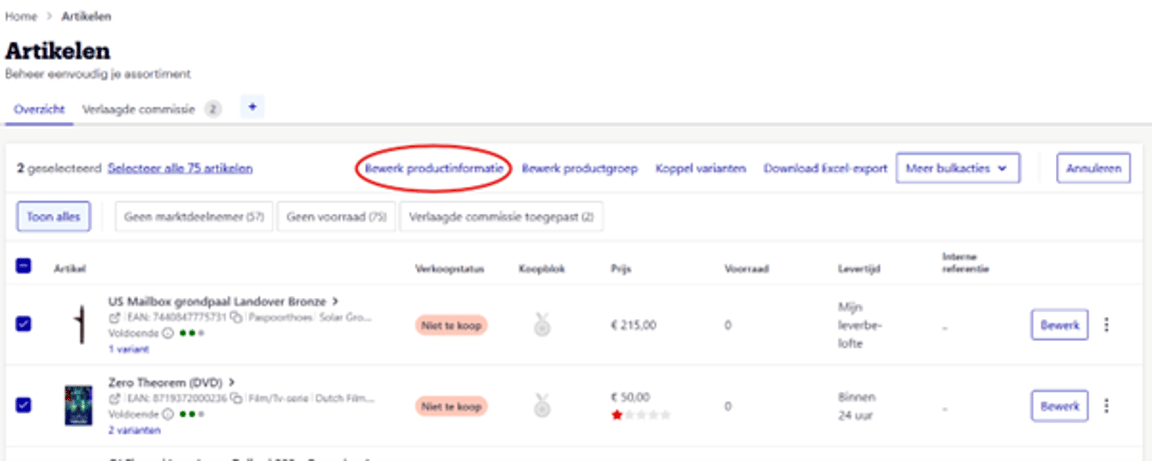
Adjust French content
In the top right, you can adjust and add French content by clicking the French flag icon.
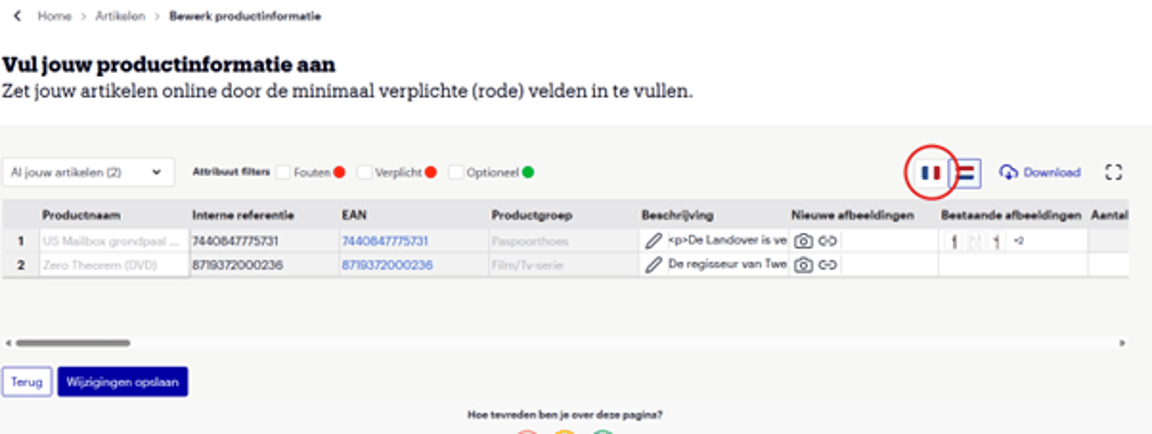
Do you also want to adjust the Dutch content?
Then click the Dutch flag icon. You can switch between them without saving in between.
All done?
Click ‘Save changes’.
And now?... Just wait!
Additions or changes will be processed within 8 hours and may then be visible on bol. It is also possible that your changes are not visible after 8 hours. This can happen because priority has been given to existing or other new content, originating from other partners or brands. For feedback on your changes, you can always refer to the 'Feedback' section in your seller account.
It is possible that French content is already present even if you haven't filled it in. We also automatically translate Dutch content if you have filled it in.
French content via your seller account
Do you want to add or adjust French content via your seller account? Please note that you should do this via the seller account you use to offer your items in Belgium. For example, do you have a separate account for the Netherlands and a separate account for Belgium? Then only this latter account will have the option to add or adjust French content via the 'Add items in bulk' option. This does not apply to seller accounts that offer items via Shipping via bol in Belgium.
Add French content via 'Add items in bulk'
You can add French content in bulk in the seller account. You do this by following these steps:
In your seller account, go to ‘Add items in bulk’.
Upload your Excel file as usual.
Fill in everything in Dutch, including the title and possibly the description. This is necessary to create the item.
Continue all steps in Dutch.
So, link your Excel information to the correct columns and place the items in the correct Dutch-language product category.
Open French content via the flag icon
When you land on the ‘Complete your content’ screen, you have the option to click the French flag icon in the top right. You will then arrive at the page where you can add or adjust French content.
Do you also want to adjust the Dutch content?
Then click the Dutch flag icon. You can switch between them without saving in between.
All done?
Click ‘Save changes’.
And now?... Just wait!
Additions or changes will be processed within 8 hours and may then be visible on bol. It is also possible that your changes are not visible after 8 hours. This can happen because priority has been given to existing or other new content, originating from other partners or brands. For feedback on your changes, you can always refer to the 'Feedback' section in your seller account.
It is possible that French content is already present even if you haven't filled it in. We also automatically translate Dutch content if you have filled it in.
French item characteristics
When making adjustments to Dutch content, only changes to item characteristics that are selected from fixed options in a drop-down menu are translated. Changes to item characteristics that are free-text fields, such as the title and description, are only translated once into French. Of course, you can easily adjust existing French content via the bulk editor.
Not all item characteristics you can fill in Dutch will also appear on this French editing page. Some item characteristics are automatically translated from Dutch. These are characteristics that you can select from options in a drop-down menu, not free-text fields. If the information on the website is incorrect because of this? Then adjust this item characteristic in Dutch, as this will automatically be applied in French as well.
Add item language characteristics
For some items, additional information is requested about the item's language, manual, and packaging. This does not concern the item's description, but rather the ‘language characteristics’ you assign to an item. For example, this includes filling in the correct item language so that Dutch-language games are not shown in the French-speaking environment, while French-language games are.
Language characteristics have been mandatory since August 1, 2020. Therefore, we ask you to fill these in to put the item online. This means that items for which language characteristics are not filled in – but are relevant – will not be put online in both the French and Dutch-speaking environments.
- Is the language characteristic not relevant? Then you don't need to fill in a language characteristic. Then the content is automatically machine-translated and published live in the French-speaking app/website. You don't need to do anything for this.
- Is the language characteristic relevant? Then you need to fill in the language of the item, the manual, and/or the packaging. For the relevant item type, what is relevant has already been pre-selected – so a language manual will not be requested for every item.
- Is the language characteristic relevant and the language is French, English, universal, not applicable, no language, or registered as '-'? Then the content is automatically machine-translated and published live in the French-speaking app/website. You don't need to do anything for this.
- Is the language characteristic relevant and something other than the above options is filled in? Then the item will not be shown to French-speaking customers, and no translation will occur.
- Exceptions are Dutch-language books and CDs. These are shown in the French-speaking app and not translated, making it clear that it is a Dutch-language book or CD.
Add language attributes via the seller account
It is possible to fill in the language attributes for each item individually or in bulk. The possible values for the language attributes are: "German", "English", "French", "No language", "Dutch", "Universal".
- Per item: on the 'My Items' page, you can edit each item individually. On the item page, go to the 'Content' tab and fill in the correct information for the language attributes under 'Required'.
- In bulk: if you select more than one item on the 'My Items' overview page, you will gain access to the bulk content editor. In the bulk content editor, you can edit the information of multiple items simultaneously.
To ensure that the items are available online, all mandatory attributes marked in red must be filled with values. Language attributes are part of this group of attributes: they must therefore be filled with one or more languages.
Add language characteristics via the API
Via the data model, for product categories where language is relevant, you are asked to fill in language attributes. The number of language attributes that need to be filled in depends on the product category.
The data model determines which languages can be added per category or item. In most cases, you can choose from the following values: German, English, French, No language, Dutch, and Universal. Please note: these attributes are ‘multivalues’. This means they can support multiple values.
If an item is relevant for the Belgian French-speaking market, you must indicate that the item and/or the manual and/or the packaging language can be used by French-speaking customers. You do this by adding ‘French’ or ‘Universal’ or ‘No language’ (if not applicable) as a value.
‘Universal’ can be used if an item is available in multiple European languages.



Manuals required
To sell via bol in Belgium, Belgian regulations legally require you to provide a manual in both Dutch and French. This does not mean you are obliged to make them available online, but you must physically include them with the shipment. Exceptions to this are smoke detectors and carbon monoxide detectors. For these, you must also make the manuals available online in Dutch and French. When uploading the manuals online, ensure that both versions (Dutch and French) are in the same file.